On-premise System Architecture
The core of what we’re offering is two OCI images which we distribute from our own image repository. During the creation of the images they are automatically tested by our pipeline and then scanned by our repositry for security. Except for these images a database is also needed. More on how everything is tied togheter in the section System Layout
Moodle Image
Our images are based on the official Ubuntu LTS images from Docker Hub. From Ubuntus official repositories we then install the following packages (dependencies not listed):
software-properties-commonca-certificatesghostscriptcroncurlwgetunziplocaleslocales-allnet-toolsopenssh-serverparallelsassclibmcrypt-devphp-pearunixodbc-dev
We are also adding a couple of external repositories, mainly to get utilities not provided by Ubuntu or more recent versions.
From https://launchpad.net/~zabuch/+archive/ubuntu/ppa we are adding the following packages (dependencies not listed):
moosh
From https://launchpad.net/~ondrej/+archive/ubuntu/nginx-mainline we are adding the following packages (dependencies not listed):
nginx
From https://launchpad.net/~ondrej/+archive/ubuntu/php we install our PHP packages. Exactly what packages we install depends on which PHP version is being used. (dependencies not listed):
8.0 |
8.1 |
|---|---|
Moodle 4.0 |
Moodle 4.0, 4.1, 4.2 |
|
|
|
|
|
|
|
|
|
|
|
|
|
|
|
|
|
|
|
|
|
|
|
|
|
|
|
|
|
|
|
|
|
|
|
|
|
|
|
|
|
|
|
|
|
To get support for MS SQL Server we are adding Micrososfts repository https://packages.microsoft.com/ and are installing the following packages from it:
msodbcsql17
As part of the requirements for MS SQL Server we are also installing these packages through PHP PECL:
sqlsrvpdo_sqlsrv
We are also installing a few utilities manually.
composerby using their script based installer found here https://getcomposer.org/installers6-overlayby download the archives from Github, currently version 2.2.0.3
SSL Termination
The image doesn’t terminate SSL, it’s built with the intention that a reverse proxy or load balancer sits infront and is responsible for terminating SSL. We have a simple reverse proxy image you can use if so desired.
Our Reverse Proxy
We have created a simple nginx-based reverse proxy image you can use if you wish and it has built-in support for SSL-termination. While it’s most commonly paired with a secondary container that automates certficates from Let’s Encrypt there are no issues using it with your own certficiate regardless of provider. You can read more about this in section: Ports, Proxy & Varnish
Varnish
Just as we have a simple reverse proxy image we also have a customized image of Varnish specially configured for Moodle. You can read more about it in this section: Ports, Proxy & Varnish
Moodle Cron Image
Is basically a superset of the Moodle image but instead of starting the webserver it starts a cron service instead. The cron runs every minute and is responsible for the execution of the configured cron jobs in Moodle.
System Layout
Here is a crowded illustration on how everything flows. Everything that’s more faded is optional, dashed lines are either optional or alterantives.
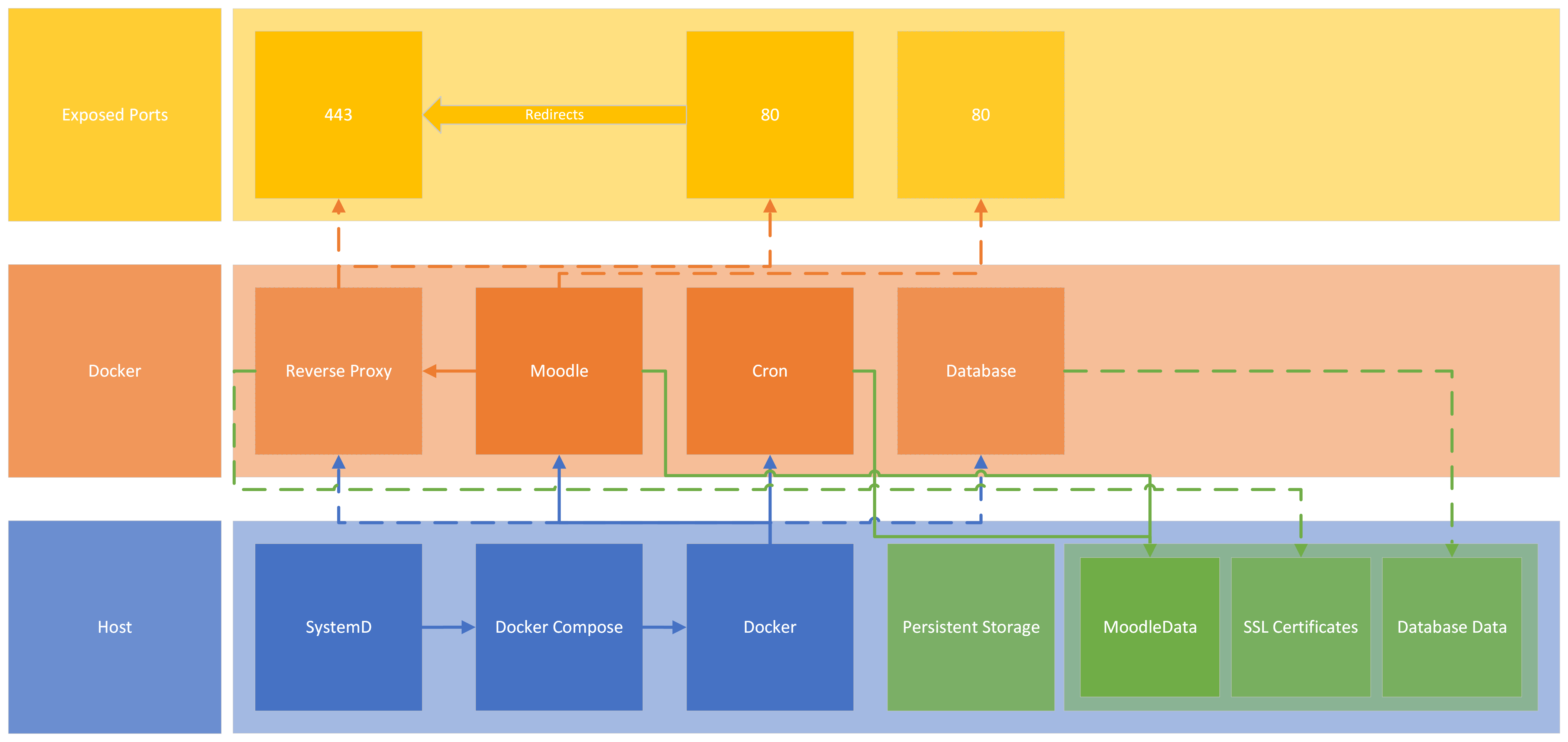
A red thread in the design is modularity. The reasoning behind this is to make it possible to scale the resources depending on load. An installation without high demands might be just one server that acts as both app server and database server. As an app server it would then run both the moodle and moodle-cron container and data would be stored directly on the host. Additionally it might also run a reverse proxy to enable SSL support.
In a more demanding situation things might be split. For instance there might be three app servers, one cron server, one read-write database, two read-only databases, a storage server and a load balancer. In this case the load balancer would terminate SSL, connect to one of the app servers. The app servers in turn would mount storage from the shared storage and also keep a local cache. They would also be configured to use the three different databases. The cron server would also be connected to the shared storage and the different databases.
There is also the possibilty to add more caching like Varnish and Redis.
These two are of course not the only options, they are more to the extreme opposite ends of a sliding scale.